IAM permission check
Last updated 11 October 2026
ARNscope checks what the AWS role behind your profile is allowed to do, so it can tell you before a click fails. It uses the IAM policy simulator, which evaluates your policies without calling the services themselves. The check only reads: it calls sts:GetCallerIdentity and iam:SimulatePrincipalPolicy and never creates or changes anything in AWS.
The check is there to explain, not to block. A feature is disabled only when a policy denies it outright. When ARNscope cannot be sure, it leaves everything enabled and lets AWS answer.
What is checked
When you pick a profile and region, ARNscope loads its cached result at once, and runs a check in the background only if nothing is cached or the result is more than 24 hours old. It only checks the profile you are using. The steps are:
- Who you are. It calls
sts:GetCallerIdentityfor the profile. - The role. The simulator needs the role, not your session. An assumed-role session such as
arn:aws:sts::123456789012:assumed-role/OpsReadOnly/janebecomes the rolearn:aws:iam::123456789012:role/OpsReadOnly. An IAM user is simulated as it is. The account’s root user is shown as allowed for everything. Federated users and other identity types cannot be checked, and the check says so. - The simulation. One
iam:SimulatePrincipalPolicycall covers every IAM action ARNscope uses, for examplelambda:ListFunctionsorssm:StartSession. It runs against all resources (*), with the region you use, a secure transport flag and the current time as context. IAM is called inus-east-1(orcn-north-1andus-gov-west-1for those partitions), whatever the region you browse. The call times out after 20 seconds.
Each action ends in one of four states:
| State | Meaning | Effect in ARNscope |
|---|---|---|
| Allowed | The simulator allows it. | Nothing. |
| Not allowed | A policy denies it with an explicit deny, an organization policy (SCP) blocks it, or the role has no allow for a list or describe call. These cannot be limited to one resource, so no allow at * really means no. |
The feature can be disabled or marked. |
| Not confirmed (limited) | The role allows it only on some resources, for example one bucket or queue, or the answer depends on something the simulator cannot see. | Never disabled. |
| Not confirmed (unknown) | The answer depends on request details the check cannot know, or on a resource policy it cannot read (KMS and Kafka data-plane actions). | Never disabled. |
Where you see it
- The shield icon in the title bar shows the state for the profile in use. A green check means checked, with the time (and “due for a recheck” when it is more than a day old). A warning shows how many actions are not allowed and names the first three. Click it to check again.
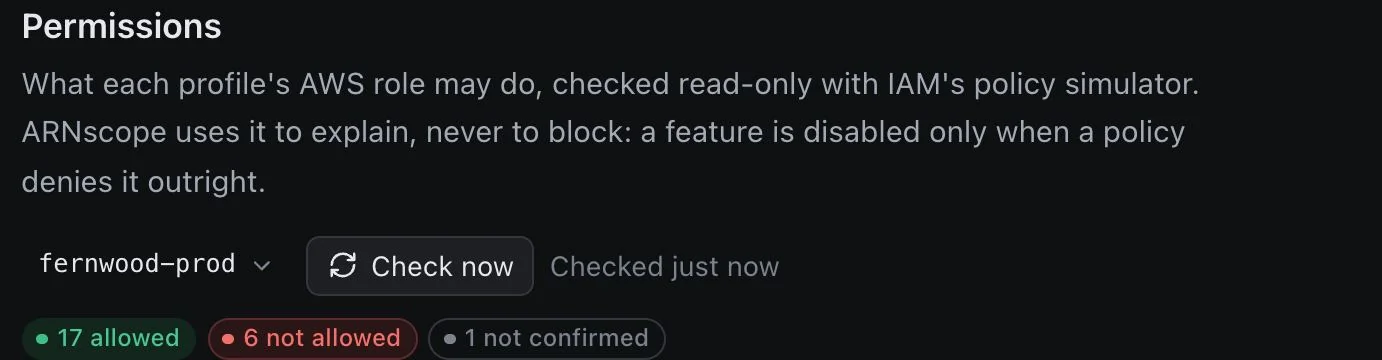
- Settings → Permissions shows the role, account and region, the counts (allowed, not allowed, not confirmed) and the list of actions the role does not allow, with the reason and a note when the action changes things. Check now runs the check again for any of your profiles.
- Disabled buttons. When the role does not allow the action behind a button, the button is disabled and its tooltip says “Your AWS role does not allow
.” Today this applies to invoking a Lambda function ( lambda:InvokeFunction), starting, stopping and redriving Step Functions executions, receiving SQS messages (sqs:ReceiveMessage) and deploying an ECS service (ecs:UpdateService). - Service icons. In the left rail, a service is marked when every action that opens its list is denied, with a tooltip such as “Your AWS role does not allow lambda:ListFunctions. You can still open it.” You can open the page anyway.
Denials learned while you work
ARNscope also watches real AWS responses. When a request to a service ARNscope tracks comes back with an access-denied error (for example AccessDenied, AccessDeniedException or UnauthorizedOperation), ARNscope:
- marks that profile’s result as stale, so the title bar says “AWS refused a request after the last check. Recheck permissions.” and Settings says so too;
- when it can name the action, marks it as not allowed with the reason “AWS refused a request that needs this action.”, which can disable the matching button until you check again. The tooltip then adds “AWS refused a recent request.”
Checking again replaces these marks with a fresh simulation. Denials from IAM and STS calls are ignored.
Caching
The result is cached in the app data folder on this Mac in permissions-cache.json, per account, role and region, for 24 hours. The file holds action names and decisions only, never credentials. Switching between profiles that share a role reuses the same result. Check now, the title-bar icon and a refused request all bypass or invalidate the cache.
If your sign-in has expired, nothing is checked or cached, and the icon says to sign in.
When the check itself is not allowed
Some roles cannot run the simulator. If AWS refuses iam:SimulatePrincipalPolicy, ARNscope shows “Your role cannot run the IAM policy simulator, so permissions are not checked.” Every action is then unknown, nothing is disabled, and if AWS refuses a request later, ARNscope shows AWS’s own message. The same happens if the simulator times out or does not answer, if you are signed in as a federated user, or if the caller type is not supported. Use Check now to try again.
Permissions
The check needs:
| Action | Used for |
|---|---|
sts:GetCallerIdentity |
Finding your role. Needs no IAM permission. |
iam:SimulatePrincipalPolicy |
Simulating your role’s policies. |
A policy that allows it, scoped to your own role:
{
  "Version": "2012-10-17",
  "Statement": [{
    "Effect": "Allow",
    "Action": "iam:SimulatePrincipalPolicy",
    "Resource": "arn:aws:iam::123456789012:role/OpsReadOnly"
  }]
}
AWS documents these permissions in Permissions for using the policy simulator. ARNscope does not use iam:GetContextKeysForPrincipalPolicy. Because the simulator can reveal what other entities may do, AWS suggests granting it narrowly.
What the simulator cannot see
The simulator can differ from the live environment (how the simulator works). In particular:
- Resource-based policies are only evaluated when they are supplied, and ARNscope supplies none. Access granted by a bucket, queue, key or cluster policy is not seen. That is why a grant that comes only from a resource policy can show as not confirmed or not allowed.
- Resource-scoped grants. The role is evaluated against
*, so a grant on one bucket or queue shows as not confirmed and never disables a feature. - Condition keys that depend on the real request (source IP, MFA, tags) are not known to the check. Where a policy needs them, the result is unknown. AWS also documents that IAM database authentication does not support some global condition keys.
- Session policies passed when the role was assumed belong to your session, not to the role, so they are not part of the simulation.
- Service control policies are evaluated by the simulator, but resource control policies (RCPs), VPC endpoint policies and some role-chaining and multiple-resource-policy cases can still give different live results.
- Roles are found by name. ARNscope derives the role ARN from your session ARN, which does not carry the role’s path, so a role with a non-default IAM path may not be found by the simulator. The check then reports that it could not answer.
Treat a green result as “your identity policies allow this”, not as a guarantee, and a red one as a strong hint.
Limitations
- The check covers the actions in ARNscope’s own table, not every action in your account.
- It checks only the profile in use, plus whichever profile you choose in Settings → Permissions.
- It cannot see resource policies, session policies or request-specific conditions (above).
- Federated users, and other identity types than IAM users, assumed roles and the root user, cannot be checked.
- A disabled button reflects the last check or the last refused request, so it can be out of date after a policy change. Use Check now after changing a policy.
Need another way to check access? Write to [email protected] and tell us what you use.