DynamoDB favourite queries
Last updated 11 October 2026
If you run the same DynamoDB read again and again, such as the open orders for a customer or a scan of a small lookup table, you can save it as a favourite. A favourite remembers the table, the query and where it runs. Selecting it switches ARNscope to that profile and region, opens the table and runs the query.
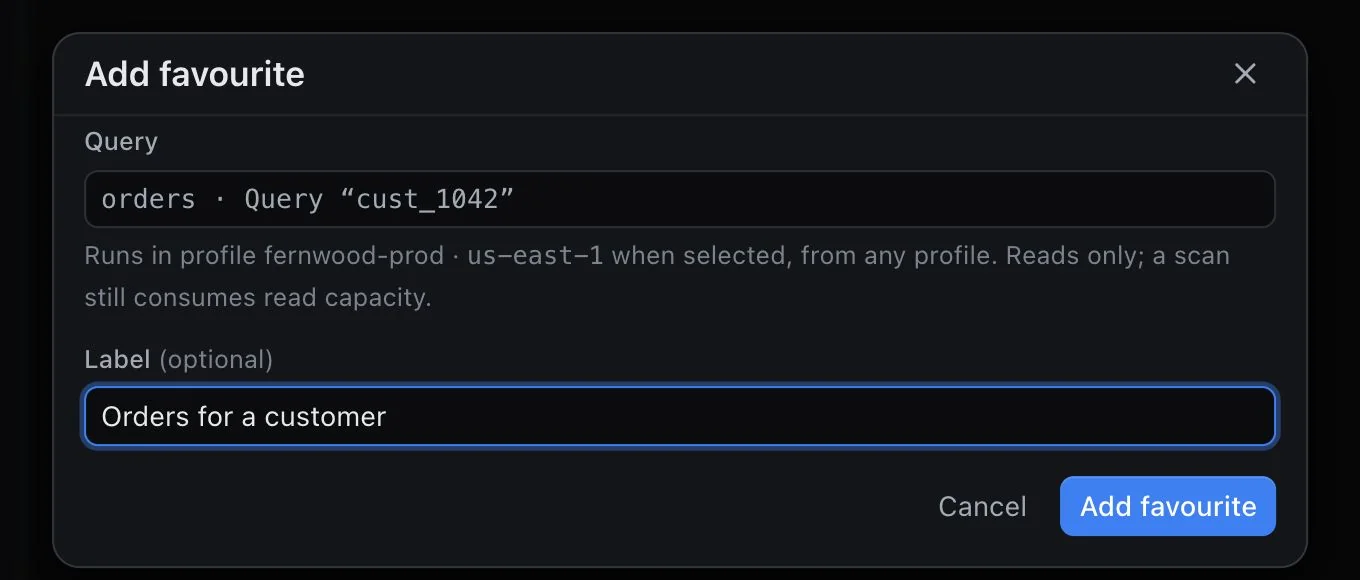
Save a favourite
- Open DynamoDB, choose a profile and region, and select a table.
- Set up the read: Scan, Query or Get item, with its key values, index, filter and options. You do not need to run it first.
- Click the star, Add query to favourites, next to the run button.
- Optionally type a Label, such as “Open orders”, and click Add favourite.
ARNscope only saves a read that could run. If a required key value is missing, the usual error appears (for example “Enter a value for partition key “customer_id”, or use Browse.”) and nothing is saved. Only reads can be favourites. DynamoDB in ARNscope is read-only.
The dialog shows the query as it will be described in the list, and a reminder that it runs in the profile and region you are in when you save it. A scan still consumes read capacity each time you run it.
When the query on screen is already a favourite, the star is filled and its label becomes Remove query from favourites. Click it to remove the favourite.
Run a favourite
Favourites are pinned under the table list in the left pane, with a heading Favourites. They are shared across all profiles and regions, so the list is the same wherever you are.
Select one and ARNscope:
- Switches the whole app to the favourite’s profile and region, if you are not already there, and waits for that region’s tables to load.
- Opens the table and reads its current schema.
- Fills the query builder with the saved fields.
- Runs the read and shows the first page.
It runs by itself. Selecting a favourite is a deliberate click, and the read is the one you saved. The favourite you have open is highlighted. Hover over a row to see the full query, the profile and the region.
If something has changed, you get an explanation instead of a result:
- The profile no longer exists in your AWS config: “The AWS profile “…” is not in your AWS config, so this favourite cannot run. Add the profile back, or remove the favourite.”
- The index was removed from the table: “Index “…” no longer exists on …”.
- The table is gone or you are not allowed to read it: the same error as opening the table normally.
What is saved
Each favourite stores:
| Field | Notes |
|---|---|
| Profile and region | Where the query runs, as they were when you saved it. |
| Table | The table name. |
| Operation | Scan, Query or Get item. |
| Table or index | The index name for a scan or query, empty for the table itself. |
| Key values | Partition key value, sort key condition and values (=, <, ≤, >, ≥, begins with, between), as you typed them. |
| Filter and projection | Filter expression, projection expression, expression names and typed expression values. |
| Page size | Read up to … items per page, 1 to 1,000. |
| Options | Newest sort key first (queries) and Strongly consistent. |
| Label | Optional, up to 80 characters. |
It does not store results, the page you were on or any credentials. Running a favourite always starts at page 1.
Favourites are kept on this Mac only, in the app’s browser storage under the key arnscope_dynamodb_favourites. They are not synced, and they are not in your AWS account.
Rename and remove
Hover over a favourite and click its actions button (three dots). Choose Rename to change the label, or Remove from favourites. An empty label shows the description of the query again. Renaming does not change the query. To change what a favourite runs, set up the new query, save it, and remove the old one.
How duplicates are detected
Saving a query that matches an existing favourite does nothing. Two favourites match when the profile, region and table are the same and the parts of the query that actually matter are the same:
- A Scan ignores key text left over in the form.
- A Get item ignores index, filter, expression values and page size.
- A Query ignores the sort key values when no sort condition is chosen, the second value unless the condition is between, and Newest sort key first only counts for queries.
- Leading and trailing spaces in expressions and JSON are ignored.
The same rule decides whether the star is filled for the query on screen.
Permissions
A favourite runs the same reads as the DynamoDB page:
| Action | Used for |
|---|---|
dynamodb:ListTables |
Listing tables in the region |
dynamodb:DescribeTable |
Reading the schema and indexes before every run |
dynamodb:GetItem |
Get item |
dynamodb:Query |
Query |
dynamodb:Scan |
Scan |
Saving a favourite sends no request. Use the permission check to see which of these your profile is missing.
Limitations
- Favourites live on this Mac only. There is no sharing, no sync between machines and no import or export.
- Only get, query and scan are supported. ARNscope has no PartiQL and no writes, so there is nothing to save for those.
- A favourite does not remember results, paging position or the sort order of the grid.
- Favourites are tied to a profile name. If you rename or remove the profile in your AWS config, the favourite cannot run until you add it back.
- Selecting a favourite switches the profile and region for the whole app, not just the DynamoDB page.
- To change a saved query you save a new one. There is no edit in place, only a rename.
Need something that is not here? Write to [email protected] and tell us what you use.